
Handheld ordering devices for waiters
Professional handheld ordering devices for bars, restaurants and cafés. Speed up service in your business with handheld terminals that let you take orders directly at the table and send them to the kitchen, the bar and the POS system, with no unnecessary trips.
In a restaurant, every minute counts. When waiters have to go back to the bar to enter orders, delays happen and the risk of mistakes increases. An electronic handheld ordering device for hospitality helps organise work better, cut trips and improve communication between the dining room and the kitchen.
At Maquinaria Hostelería MR we offer different solutions: Android handheld ordering devices with built-in card terminal and printer, IP68 rugged terminals and complete packs with a Wi-Fi kitchen printer. We help you choose the right equipment for your business and check its compatibility with your POS software.
Showing all 3 resultsSorted by price: low to high
-

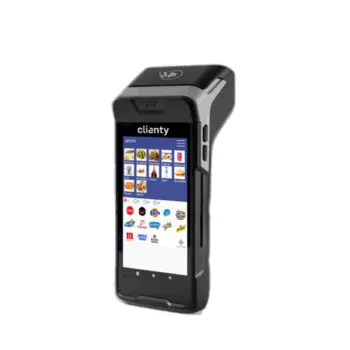
Carbono handheld ordering device with built-in card terminal
199,00 € + VAT · 240,79 € inc. VAT Add to basket -
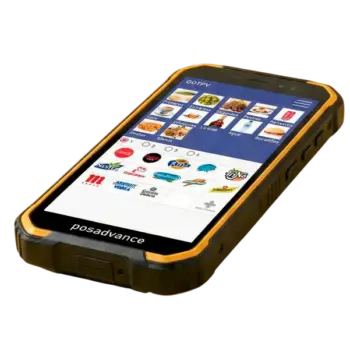
Heavy-Duty Handheld Ordering Kit
249,00 € + VAT · 301,29 € inc. VAT Add to basket -
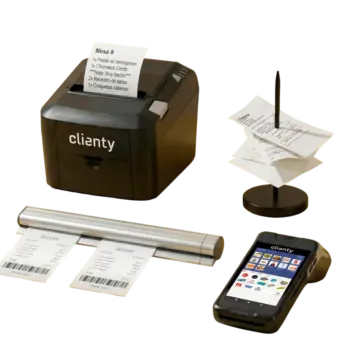
Ordering Pack: Carbono handheld + kitchen printer + organisation set
369,00 € + VAT · 446,49 € inc. VAT Add to basket
What is a handheld ordering device for waiters and how does it work?
A handheld ordering device is a portable device that lets front-of-house staff record customers’ orders without using paper or going to the POS at the bar.
It works simply: the waiter selects the table, enters the drinks and dishes ordered and confirms the order. The hospitality software sends the information to the relevant areas, where it can appear on the management system or be printed on the configured printers.
For example, in a restaurant a customer orders two soft drinks, a salad and two main courses. With the system set up correctly, the drinks can be sent to the bar and the dishes to the kitchen. Each area receives the information it needs and can start preparing the order without waiting for the waiter to come back.
This way of working is especially useful during the busiest services, when several tables are ordering at the same time.
Types of handheld ordering devices for waiters
Dedicated handheld ordering devices. Devices designed specifically for hospitality, with a physical keypad or touchscreen and a system focused solely on taking orders. They stand out for being sturdy and simple: they do one thing and do it well.
Mobile waiter POS on a tablet or smartphone. Terminals based on a touch device with hospitality software installed. They offer a large screen, pictures of the dishes and extended functions such as bill splitting or table management. They are a versatile option for venues that want a complete mobile POS for waiters .
Handheld ordering devices with built-in printing or payment. Some devices include a receipt printer or let you connect a card terminal, so the waiter can present the bill and take payment at the table. They are very useful on terraces and in services where customers appreciate not having to go up to the bar.
Benefits of using electronic handheld ordering devices in hospitality
Faster, more organised service
Waiters can record orders right at the table. This cuts trips to the bar and lets them spend more time looking after customers.
Fewer errors when passing on orders
The information is entered once and shared digitally. This avoids misreading handwritten notes and the mistakes that can happen when an order is re-entered on the POS.
Better coordination between dining room, bar and kitchen
With compatible software and the printers configured, each area receives the orders that concern it. This organisation makes work easier in restaurants, cafés and venues with several preparation areas.
Greater control of tables
Depending on the functions of the software used, the waiter can check open tables, add new orders and handle changes without constantly going back to the main terminal.
Payment at the table with the right models
Handheld ordering devices with a built-in card terminal combine order taking and payment in a single terminal, provided the payment service has been properly enabled.
Which handheld ordering device should you choose for your business?
Not every business needs the same equipment. The choice depends on the type of service, the working conditions and whether you only need to take orders or also take payment directly from the customer.
| Device | Card terminal | Printer | Screen | Connection | Protection |
|---|---|---|---|---|---|
| Carbono handheld ordering device with built-in card terminal | Built in | Built-in thermal receipt printer | 5.5″ HD | Wi-Fi and 4G | — |
| Heavy-Duty Handheld Ordering Kit | No | No | 5.71″ HD+ | Long-range Wi-Fi and 4G | IP68 |
| Ordering Pack | Built into the handheld device | On the handheld device and in the kitchen (Wi-Fi) | 5.5″ HD | Wi-Fi and 4G | — |
Android handheld ordering device with card terminal and printer: take orders and payment at the table
This solution combines the functions of an order-taking terminal with those of a payment device.
It has a 5.5-inch HD touchscreen, Wi-Fi and 4G connections, a card reader and a built-in receipt printer.
Its main advantage is that it lets you carry out different operations from the same device: record orders and, through a compatible payment service, take payment and print the receipt beside the customer.
Recommended for: restaurants with table service, cafés with a terrace and businesses that want to cut trips between the tables and the till. See the Carbono handheld ordering device with built-in card terminal.
IP68 heavy-duty handheld ordering kit: built for intensive use
On terraces, beach bars and very busy venues, how tough the device is matters even more.
This ruggedised handheld ordering device has IP68 protection against dust and water, a 5.71-inch HD+ screen, a 4,000 mAh battery and Wi-Fi and 4G connections.
It is designed for demanding environments where an ordinary device would be more exposed to knocks, splashes and dirt.
Recommended for: bars with large terraces, beach bars, restaurants with outdoor service and businesses where staff are constantly on the move. See the Heavy-Duty Handheld Ordering Kit.
This model does not have a built-in card terminal.
Ordering Pack with Wi-Fi kitchen printer: connect the dining room with the kitchen
For businesses that need to set up an ordering system, the pack brings together several essential elements:
- Handheld ordering device with built-in card terminal and printer.
- Wi-Fi printer to receive kitchen orders.
- Ticket organisation system with aluminium rail.
The waiter takes the order at the table and, through the compatible software, the kitchen printer receives the preparation orders.
Recommended for: bars and restaurants that want to introduce digital order taking and have a dedicated kitchen printer. See the Ordering Pack.
What to check before buying a handheld ordering device
Before deciding, it is worth looking at how your venue works and what you really need from a hospitality handheld ordering device. These are the factors that matter most day to day:
- Connectivity: check that the device communicates reliably with your POS and with the kitchen and bar printers, usually over the local Wi-Fi network. Good coverage throughout the dining room prevents lost orders.
- Battery life: it should last a full shift without running out. Also consider how easy it is to recharge at peak times.
- Toughness: in hospitality, devices suffer drops, splashes and heavy use. A rugged finish and a protected screen extend their working life.
- Screen and usability: a clear interface and a comfortable screen size let any waiter, even with little experience, take orders quickly and without mistakes.
- Compatibility with your software: the handheld ordering device should integrate with the POS software you already use or are going to introduce, so that menus, prices and modifiers are always in sync.
- Weight and ergonomics: a light device is easier to handle over hours of service.
- Response speed: the smoother it is to browse the menu, the faster each order is closed.
- Modifier handling: being able to note «no onion», how the meat is cooked or allergies avoids confusion in the kitchen.
- Scalability: if you plan to grow, choose a system that lets you add more devices without redoing the whole installation.
- Support and updates: the software is kept up to date, so the equipment stays operational in the long term.
Which handheld ordering device suits each type of business
Bars and pubs. At a busy bar, a light, fast handheld device lets you fire off rounds and tapas with no bottlenecks. The priorities are speed and a battery that keeps up with the pace.
Restaurants. For taking orders in a restaurant with a dining room, table management, modifiers and bill splitting become more important. Here a mobile POS with a large screen makes for orderly service and accurate billing.
Cafés. In cafés with high turnover and small tickets, a simple device that sends the order to the bar instantly and lets you take payment quickly on the terrace or at the table is what you need.
Grill houses and taverns. In grill houses, where how the meat is cooked and portion sizes are key, a handheld device with good modifier handling cuts errors and improves coordination between dining room and kitchen during the busiest services.
Handheld ordering devices with kitchen printer: how do orders get there?
One of the most useful functions of an ordering system is passing orders between front-of-house staff and the kitchen team.
With a suitable Wi-Fi network, compatible software and a configured printer, the process is simple:
- The waiter records the order at the table.
- They confirm the order on the handheld terminal.
- The software sends the information to the assigned printer.
- The kitchen receives the ticket and can start preparing.
This means kitchen staff have the orders in writing, without depending on the waiter coming over to pass them on. If you already have a handheld ordering device, you can complete the system with a wireless (Wi-Fi) kitchen printer or choose from our receipt and kitchen printers.
Important: the Wi-Fi printer needs a stable connection and correct configuration. Compatibility between the handheld ordering device, the POS software and the printer must be checked before purchase.
Android handheld ordering devices: a solution that adapts to hospitality software
Android handheld ordering devices are portable terminals that use this operating system to run order management apps.
With the Android 10 models in our catalogue, the device can work with compatible apps for recording orders, organising tables and communicating with the venue’s POS.
However, having Android does not mean any handheld ordering device will automatically work with any POS software.
Before choosing, you need to check the Android version, the app requirements, communication with the main system and printer compatibility.
At Maquinaria Hostelería MR we can advise you on these points so you choose the equipment that best suits your business. If you do not have software yet, you can look at our POS software for hospitality.
What do you need to set up an ordering system in your restaurant?
Working with electronic handheld ordering devices takes more than the handheld terminal. The complete system may need:
- A handheld ordering device compatible with the hospitality app.
- POS software that manages tables, orders and sending orders to the kitchen.
- A stable Wi-Fi connection with enough coverage in the working areas.
- A kitchen or bar printer, when printed orders are needed.
- Configuration of the devices and the preparation areas.
Do you already have a POS installed? It will not always need replacing. First, it is worth checking whether your current software supports handheld ordering devices and which terminals are compatible.
Are you setting up a new business? We can help you assess the complete set-up: POS, handheld ordering device, printers and hospitality software. In our category of POS for hospitality you will also find the hospitality POS with handheld ordering device, receipt printer and cash drawer.
Frequently asked questions about handheld ordering devices for waiters
What is the best handheld ordering device for a restaurant?
It depends on how the venue works. If you need to take payment at the table, a handheld device with a card terminal may suit you. For terraces and demanding environments, consider a rugged IP68 model. If you need to start sending printed orders to the kitchen, a pack with a printer may be more practical.
What is the difference between a handheld ordering device and a POS?
The POS is the main system for managing sales and payments. The handheld ordering device is a portable terminal that lets you record orders from the dining room and send them to the POS software. Both can work together when they are compatible.
How does a handheld ordering device differ from a mobile waiter POS?
A dedicated handheld ordering device focuses on taking orders in a sturdy, simple way, whereas a mobile waiter POS usually offers more functions (pictures of dishes, bill splitting, built-in payment) on a larger screen. The best option depends on the volume and way of working of each venue.
Can a handheld ordering device be used without changing the POS?
Yes, with certain systems. It depends on whether the installed software supports handheld ordering devices and is compatible with the chosen model. It is advisable to check this before buying.
Can orders be sent to the kitchen and the bar separately?
Yes, when the hospitality software allows products to be assigned to different printers or preparation areas. That way, drinks can go to the bar and dishes to the kitchen.
Does a handheld ordering device need an internet connection?
To send orders it usually uses the local Wi-Fi network. Whether you also need internet depends on the software and the functions used, especially certain sync or payment services.
Can I take card payments from the handheld ordering device?
Yes, with models that have a built-in card terminal and a compatible, activated payment service. Terminals that only record orders do not necessarily do this.
Do handheld ordering devices work with any hospitality software?
No. Each app has its own requirements and compatibilities. It is important to check that the software supports the device and can communicate with the POS and the printers. If you work with GOTPV, you can purchase the GOTPV handheld ordering licence on its website. Software by System Gotpv SL: clicking takes you to gotpv.es to activate the licence. It is an annual subscription that renews every year and can be cancelled whenever you like. Prices exclude VAT; 21% Spanish VAT is added at checkout.
Which handheld ordering device is recommended for a terrace?
A model with good wireless coverage, a suitable battery and physical toughness. In venues often exposed to dust and water, an IP68 terminal can be especially worthwhile.
How long does a handheld ordering device’s battery last?
Battery life depends on battery capacity, screen use, apps and active connections. The heavy-duty kit has a 4,000 mAh battery, although its real-world duration can vary with working conditions.
Do I need to run cables to connect the kitchen printer?
A Wi-Fi printer can connect to the network without an Ethernet cable, as long as there is adequate wireless coverage. It does need a power supply.
Buy your handheld ordering device with professional advice
At Maquinaria Hostelería MR we know every business has its own way of working. A café with ten tables does not need the same system as a restaurant with a dining room, terrace and several preparation areas.
That is why, before buying, it is worth reviewing how you take orders, which software you use and where you need to receive the orders.
We help you assess the different options so you can choose a handheld ordering device suited to your venue and avoid compatibility problems.
- UK shipping: quoted on request, depending on the delivery address.
- Warranty: all our equipment is covered by warranty, backed by a team that knows hospitality first-hand.
Before you buy, let’s talk about how you work.
Contact us on WhatsApp at 622 872 311.
